Today`s Calendar
Today`s Calendar is a quick way to view all your TM and Microsoft Outlook Appointments and Meetings set for today.
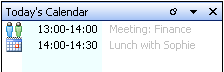
Today`s Calendar allows you to display/hide your Appointments.
To display the Today`s Calendar window, go to the main menu of the e-Mail 2.0 Module . Click the View drop down menu, then click Show Today’s Calendar.
To hide the Today’s Calendar window, click the Today’s Calendar title bar .
To minimize the Today’s Calendar window, click the Today’s Calendar title bar .