Mobile Setup – Android
In the Android cellphone you can use many of third-party applications for e-mail. For example Outlook mobile, AquaMail, Newton Mail, TypeApp, etc.
This guide will not describe settings in the concrete application. Please use help of your used application for access to the e-mail account settings.
The details which you need for the Android mail applications can be found inside the TimeMaker menu: E-Mail -> Mobile Synchronisation
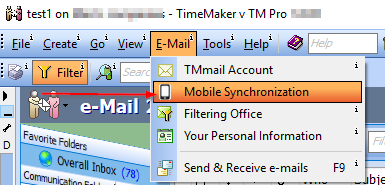
Details for the Android email applications can be found inside the TimeMaker and they will look like this:
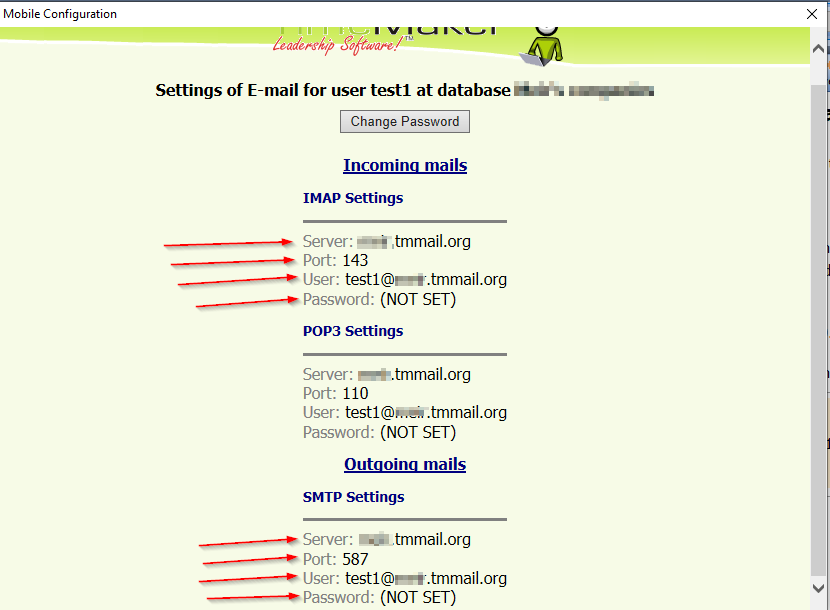
Server can often be reffered in the android devices as the “host name”
We use ports:
143 for IMAP (incoming emails)
587 for SMTP (outgoing emails)
We don´t support SSL.
Please, always use IMAP for the mobile synchronization. You can read about IMAP vs POP3 here.